
FOR HONOR TRAINING MODES
FOR HONOR TRAINING MODES
OVERVIEW
For Honor is an action fighting game with a host of innovative, deep and complex systems. Studio Gobo was hired to revamp the format of the existing onboarding to better aid the transition of new players to online competitive play, as well as develop advanced practice features to help seasoned players improve their game.
My role involved supporting the team with the new onboarding, as well as leading the design of the Training Arena feature.
DATE
February '17 - July '18
ROLE
UX Designer, Feature Lead
TOOLS
TOOLS
Axure, Photoshop, Illustrator, InDesign, Anvil (Ubisoft Engine), Jira
The challenge
Improving the Training tools for players
At launch, For Honor featured an innovative, deep melee combat system. However, its novel mechanics created a punishingly steep learning curve for new players.
Usability testing and live telemetry revealed critical onboarding gaps: players were not retaining core skills, and essential mechanics were left uncovered. As a result, new players were ill-prepared for competitive PvP, leading to significant early drop-off.
In co-development with Ubisoft Montreal, Studio Gobo was tasked with overhauling the tutorial system, and providing advanced training tools. Both of these mandates challenged us to understand the pain points experience by players, and deliver updates that truly added value to their experience.
dd
Feature Overview
APPRENTICE TRIALS
Guided sequences introducing the basics of combat, with additional tools to provide feedback and motivation.
WARRIOR TRIALS
Warrior Trials improve players’ knowledge of more advanced techniques.
TRAINING ARENA
A dedicated space to practice combos with on-screen moves, along with programmable AI bots to perfect challenging sequences.
"What's best about the new training mode, though, is the arena. Here, you can choose any hero and adjust the game settings to play whichever way you want. You can modify health, stamina and revenge, customise the AI enemies to practice new moves and prepare for specific scenarios... It looks like a pretty decent effort!"
"What's best about the new training mode, though, is the arena. Here, you can choose any hero and adjust the game settings to play whichever way you want. You can modify health, stamina and revenge, customise the AI enemies to practice new moves and prepare for specific scenarios... It looks like a pretty decent effort!"
"What's best about the new training mode, though, is the arena. Here, you can choose any hero and adjust the game settings to play whichever way you want. You can modify health, stamina and revenge, customise the AI enemies to practice new moves and prepare for specific scenarios... It looks like a pretty decent effort!"
- Eurogamer
Training Menu
A hub for all Training content
The Training Menu served as a unified hub designed to centralize all learning and practice content into one seamless experience. By providing friction-free access to the Training Arena, it allows players to dive straight into skill-building with the fewest clicks.
Clear, visual progression tracking for the Apprentice and Warrior Trials keeps accomplishments front and center, transforming skill development into a rewarding journey that continuously motivates players to level up their mastery.
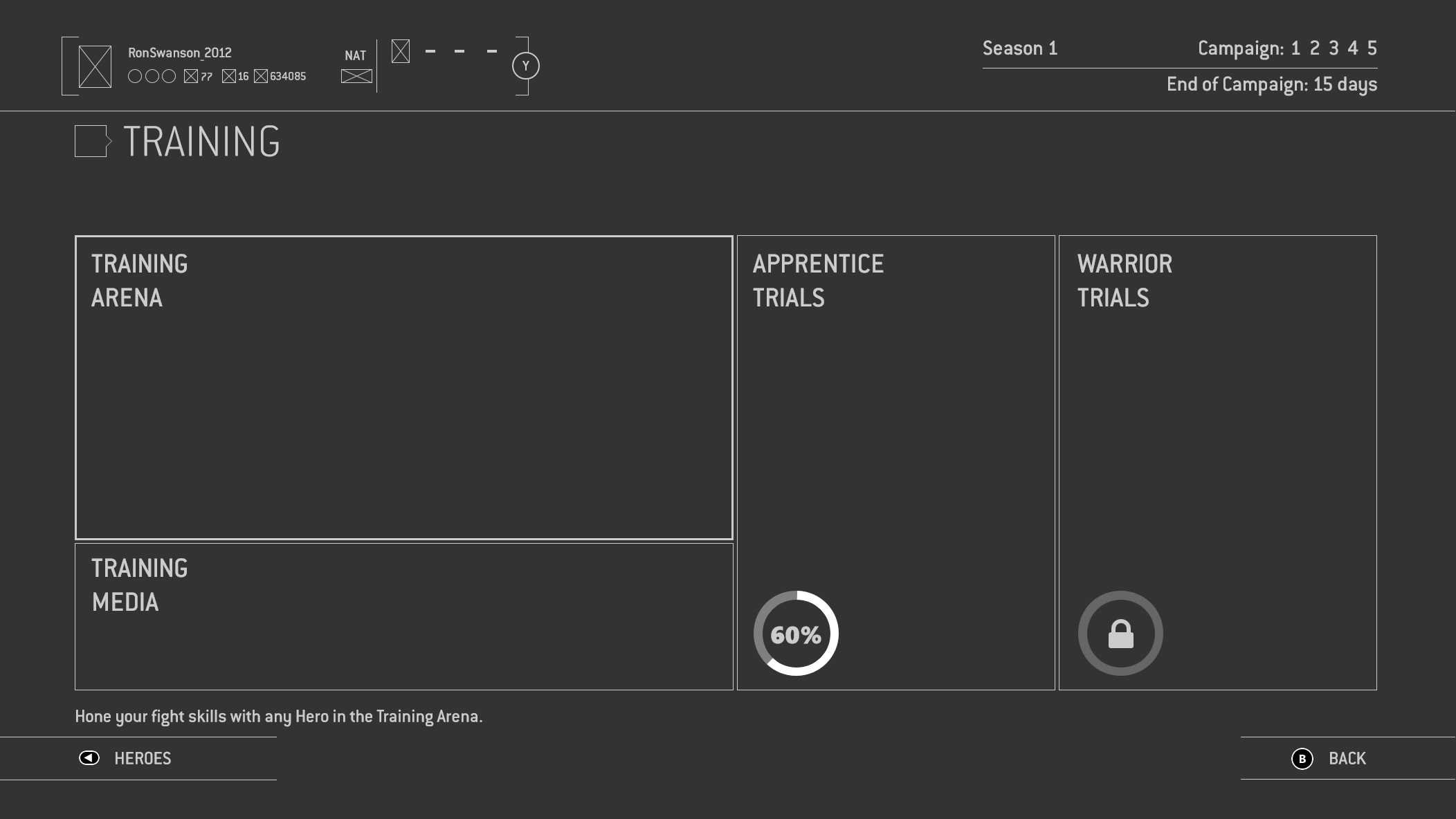
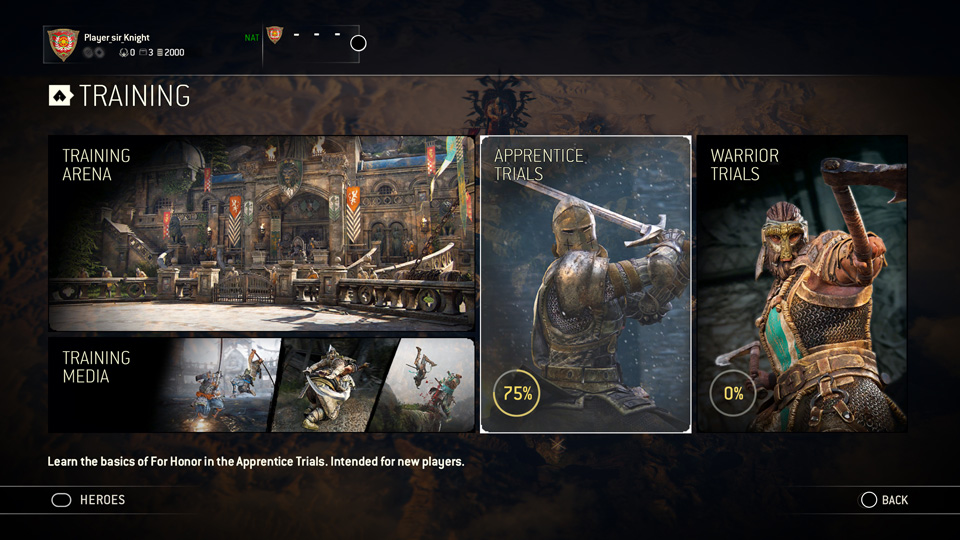
Wireframe of the Training Menu, and final in-game implementation.
Training Arena
Turning user needs into pillars
As feature lead for the Training Arena, I was responsible for defining the overall scope of the feature. Working with Game Directors, Community Managers, User Research leads, and producers, we together identified the biggest pain points facing players which I converted to user stories.
Unlike the onboarding, the Training Arena would need to cater to a wide range of players - from relative beginners to the most advanced - and provide a number of features that could scale with them. As a team we also worked to define pillars to guide the design of the Arena, focusing on big ticket items that maximised the value they would deliver to players.
Unlike the onboarding, the Training Arena would need to cater to a wide range of players - from relative beginners to the most advanced - and provide a number of features that could scale with them. As a team we also worked to define pillars to guide the design of the Arena, focusing on big ticket items that maximised the value they would deliver to players.
- Moveset Focused: The goal of the Arena is to allow the player to learn and master the abilities of specific Heroes in a safe environment, receiving feedback to help them improve.
- Customisable: The player is given the freedom to control and customise how they learn. AI in the Arena should support the player in learning their Hero's moveset, as well as helping the player understand and get better against specific Heroes.
- Flexible and Scalable: The Arena should be as flexible as possible, allowing players to quickly and easily modify settings without needing to exit. It should also be designed in a way that allows for the addition of new features as the functionality of the Arena grows.
MOVESET FOCUSED
The goal of the Arena is to allow the player to learn and master the abilities of specific Heroes in a safe environment, receiving feedback to help them improve.
CUSTOMISABLE
The player is given the freedom to control and customise how they learn. AI in the Arena should support the player in learning their Hero's moveset, as well as helping the player understand and get better against specific Heroes.
FLEXIBLE AND SCALABLE
The Arena should be as flexible as possible, allowing players to quickly and easily modify settings without needing to exit. It should also be designed in a way that allows for the addition of new features as the functionality of the game as a whole grows.
Organising the settings
To streamline navigation in the Training Arena, I structured menus around player intent and research-driven Red Routes, prioritizing high-frequency actions to minimize interactions. Categorizing options into global Arena Settings and Opponent Settings reduced visual complexity in the menus, and validated strongly in usability testing.
I also wanted to address two major friction points that existed in the tools that were already available: mandatory manual setup before every session and the inability to adjust settings on the fly. To create a seamless practice experience, I championed three key UX improvements:
- Persistent Settings: Saved configurations across sessions for quick entry.
- In-Session Customisation: Allowed real-time setting tweaks without restarting.
- Frictionless Entry: Streamlined pre-match selection down to character choice, with optional opponent and map settings available.
Once in the Training Arena, the menus needed to support a number of features. It was important to organise these in a way that made sense for players in order to ensure the information was easy to find and use.
Working with stakeholders, we separated and prioritised the features based on our discovery and research, which is summarised in the Red Routes diagram below. This enabled us to identify what actions players would most frequently perform, and ensure they were available with the fewest number of interactions.
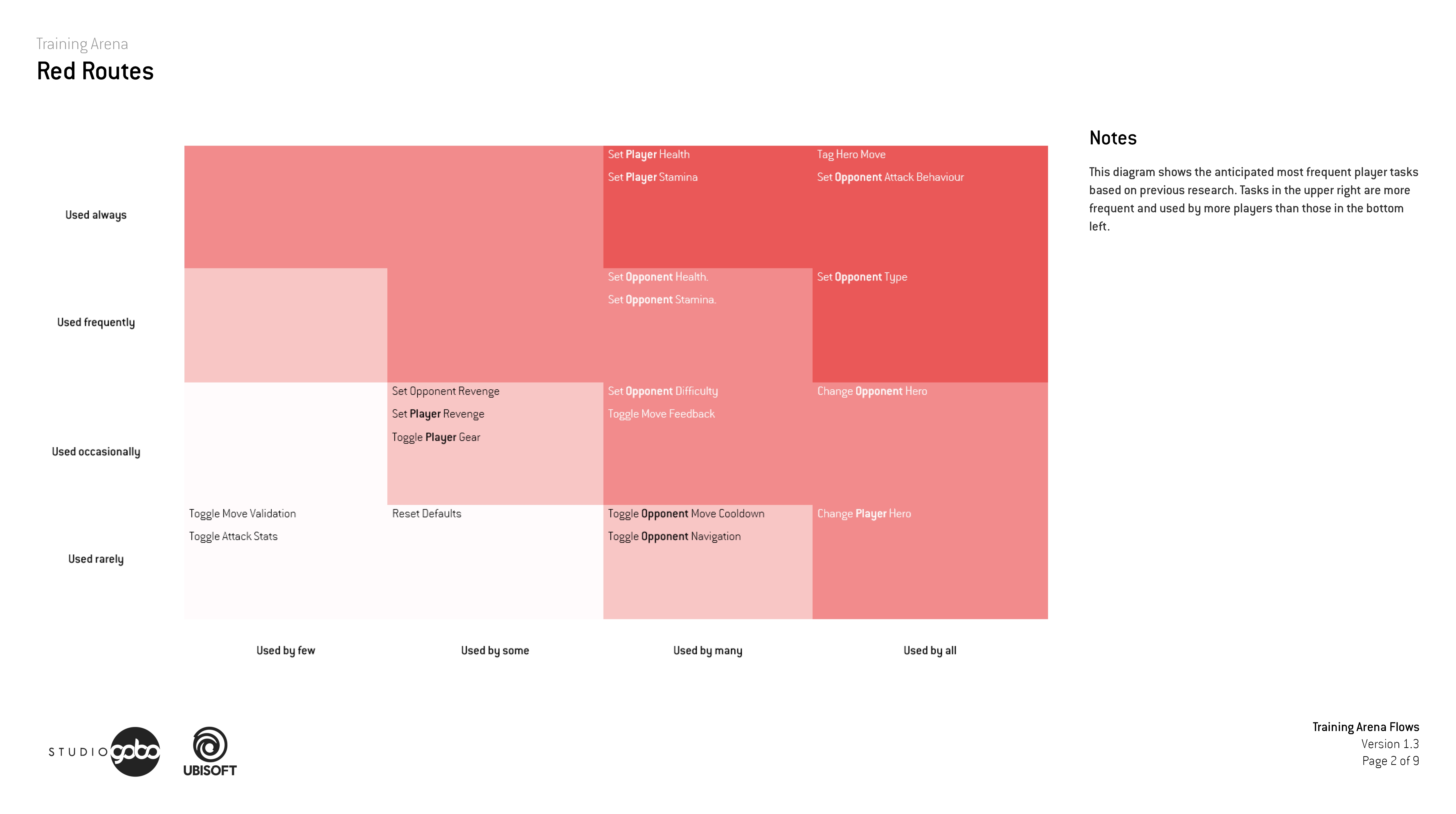
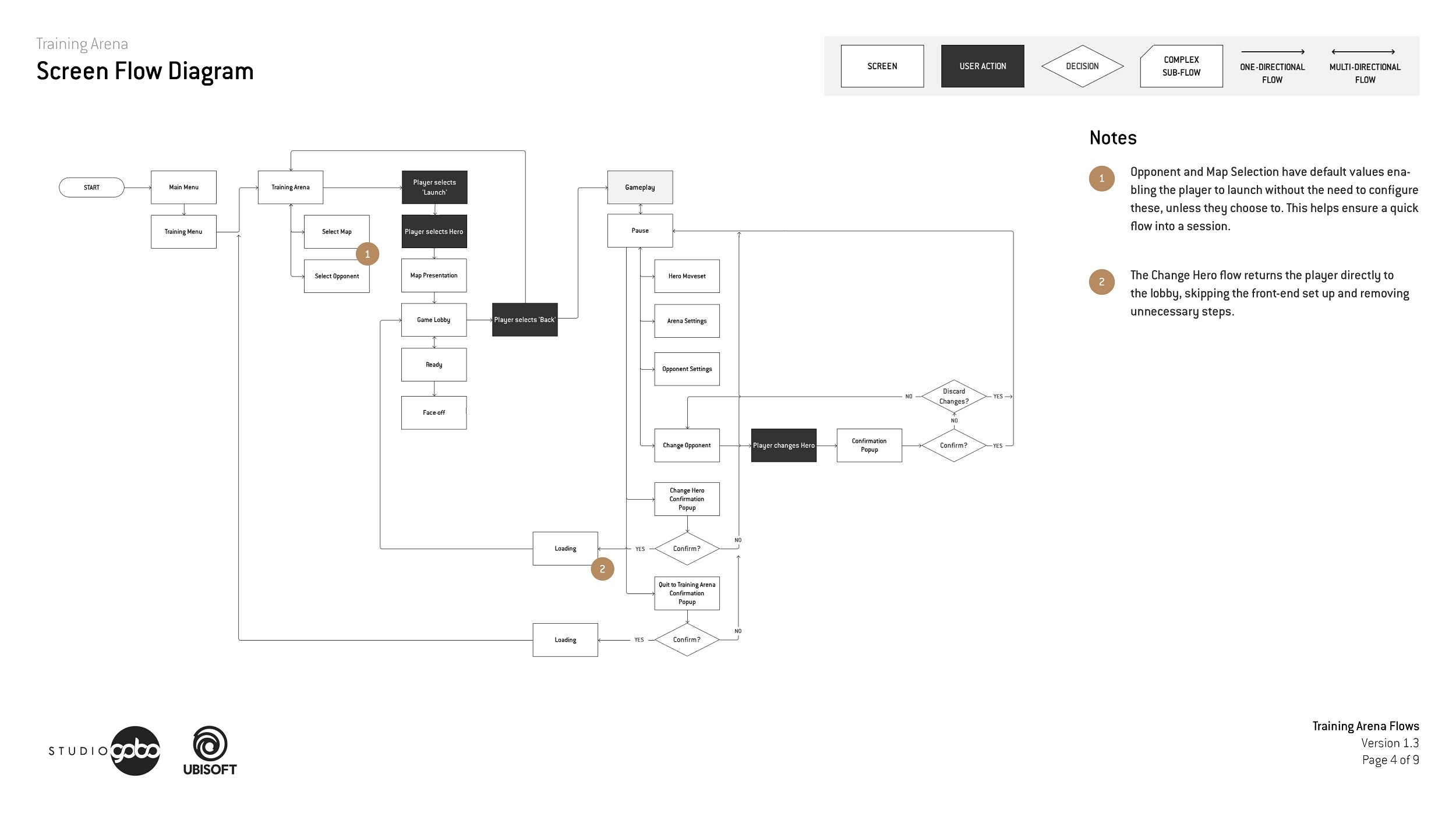
Red Routes diagram prioritised actions based on their anticipated frequency. The screen flow diagram for the Training Arena shows the player's flow through the various screens.
Key Features
Overview
To give players total control over their practice sessions, we designed the Training Arena around two core player goals: mastering a specific Hero and practicing against one. Framing the experience around these dual objectives allowed us to clearly structure complex customization options while keeping the interface intuitive.
Mastering a specific Hero
To help new players learn how to perform a Hero’s moves, we added a move tagging feature, something seen in many fighting games. Players can tag moves directly from their Moveset (a modified version of the menu seen elsewhere in game), and these are then displayed in the HUD.
To support feature discovery and execution, I proposed two key UX choices:
- Visual Input Feedback: Tagged move flashes on successful execution, providing positive reinforcement and confirmation a move was performed correctly.
- Pre-Tagged Defaults: Three moves are tagged automatically on launch, making the feature instantly visible to new players who may otherwise miss it.
An example of moves tagged to the HUD in the game, and flow for updating these.
An example of moves tagged to the HUD, and flow for updating these.
Beyond those surface level settings, we also exposed a whole range of other variables the player could modify. In addition to giving more player freedom overall, these also provided extra coverage for more advanced players to perfect the scenarios they wanted to test.
We also included a damage log where players could see how the impact of modifications they would make to their characters, giving more feedback for those looking for it
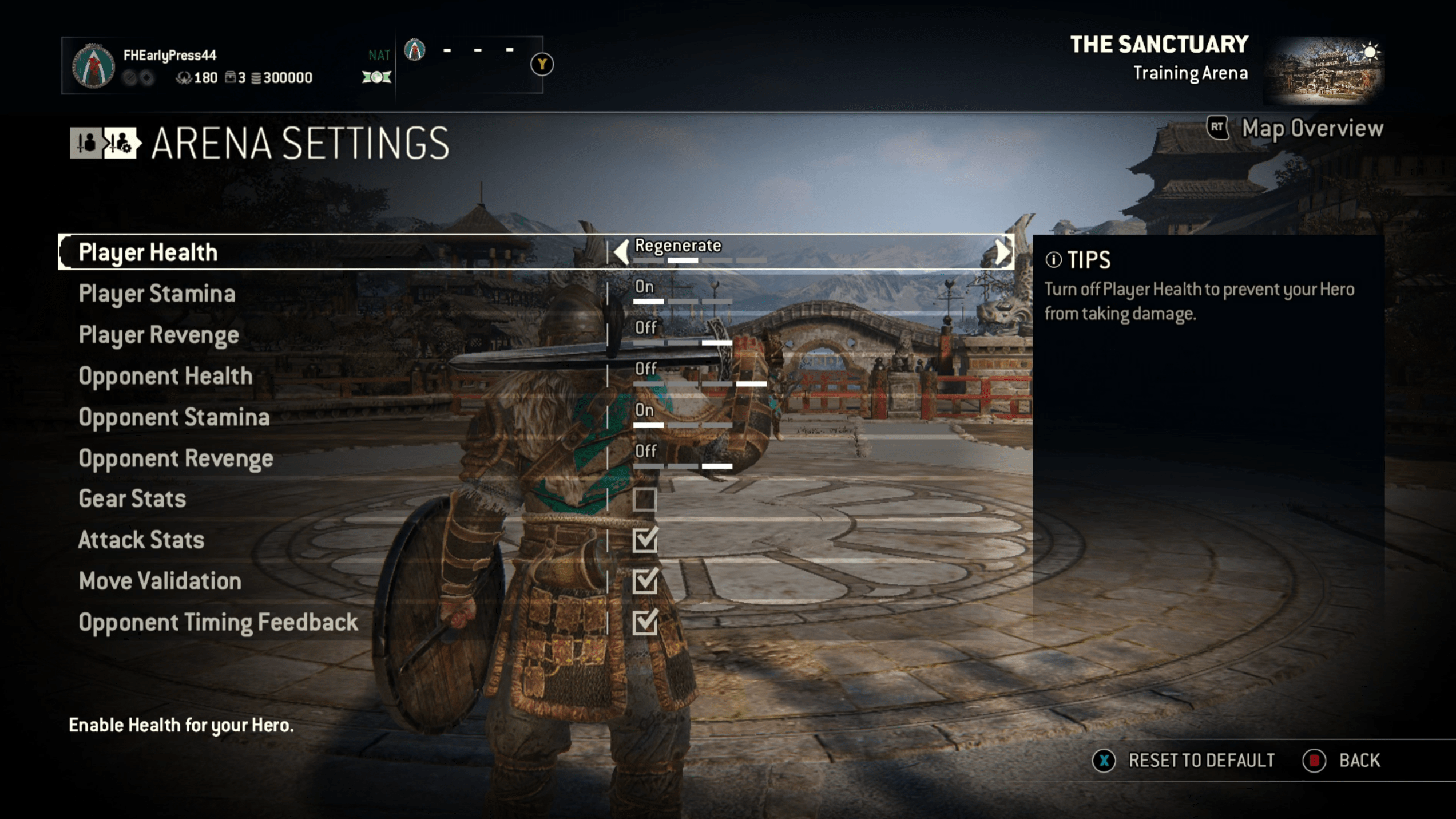
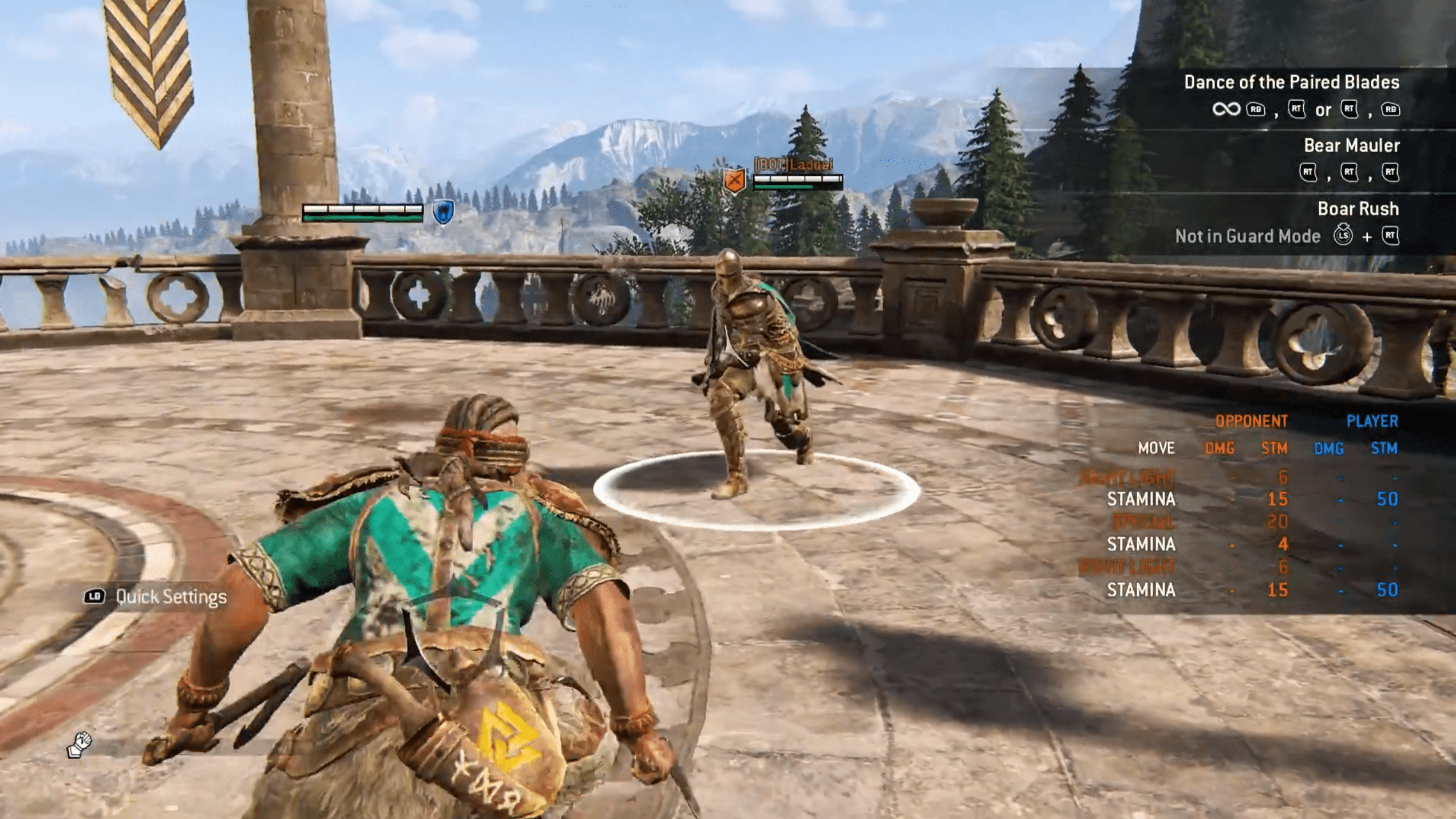
The Arena Settings menu with a host of options available, and the Damage Log in the HUD.
Changing Hero
One hard tech restriction we had for the Arena was that players could not change their Hero without ending the session. In the initial design, for players to change their Hero they needed to quit to the Arena menu manually, and then relaunch. While this achieved the basic function, the lack of a clear call to action meant that players were not always immediately sure how to complete this fundamental task.
Working with engineers, we added an explicit "Change Hero" option to the menu. Additionally, rather than simply returning players to the Training Menu, we developed additional tech to load directly into the lobby, removing more steps from the flow.
The final Change Hero flow in game, demonstrating the minimal steps required. Though new tech was needed to support it, it was a massive win for players.
Play any Hero
As players work through For Honor, they can invest currency to purchase and unlock new Heroes. While many Heroes were available to play even if not unlocked, Heroes released as part of the DLC could not be used unless purchased.
With the Training Arena, we saw an opportunity to let players play as any Hero in the game. This allowed them to test drive the Heroes before committing, creating a better experience for players, and a stronger drive for them to purchase Heroes they enjoyed practising with.
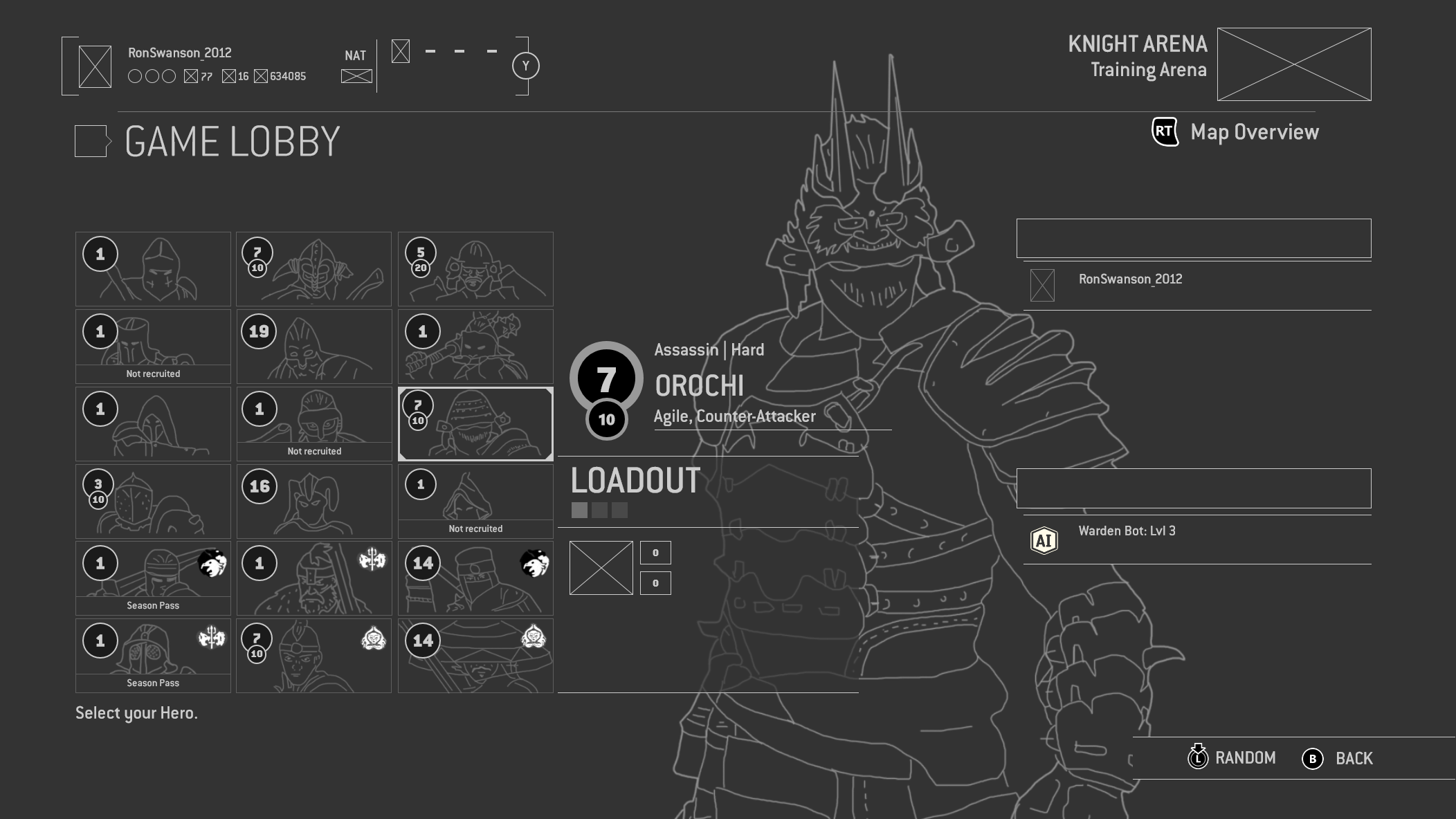
Players are free to select any Hero in the game, whether they own them or not.
Players are free to select any Hero in the game, whether they own them or not.
Practicing against a specific Hero
Through iterative prototyping, I designed a solution allowing players to select opponent moves directly from a list, featuring move names and inputs. This was chosen as it was the most accessible approach - it didn't rely on players knowing precisely which moves they struggled with, nor did they need to manually perform them (which wasn't always the easiest thing to do!).
Within the system we allowed the player to "tag" up to 4 moves for the AI to perform. This meant players could tailor the difficulty of the bot, helping them master the timing of a single move and increasing complexity at their own rate. Players could also toggle full AI and adjust difficulty levels, striking a balance between scenario customization and menu simplicity.
As opponent move lists expanded, navigation became cumbersome. I introduced category filters to simplify browsing, along with a persistent summary panel showing active selections. This allowed players to monitor active AI moves and deselect them instantly without re-navigating complex submenus.
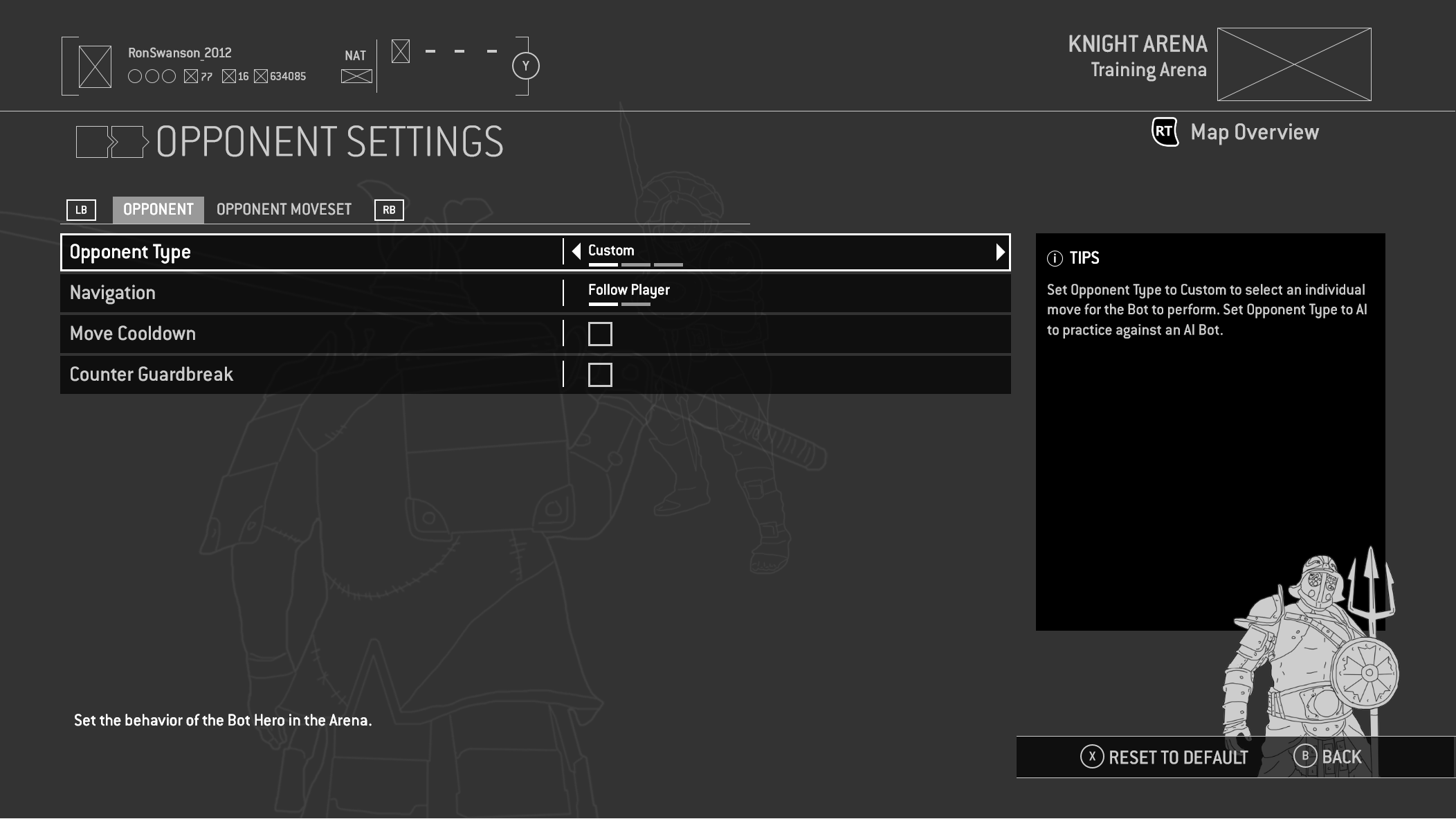
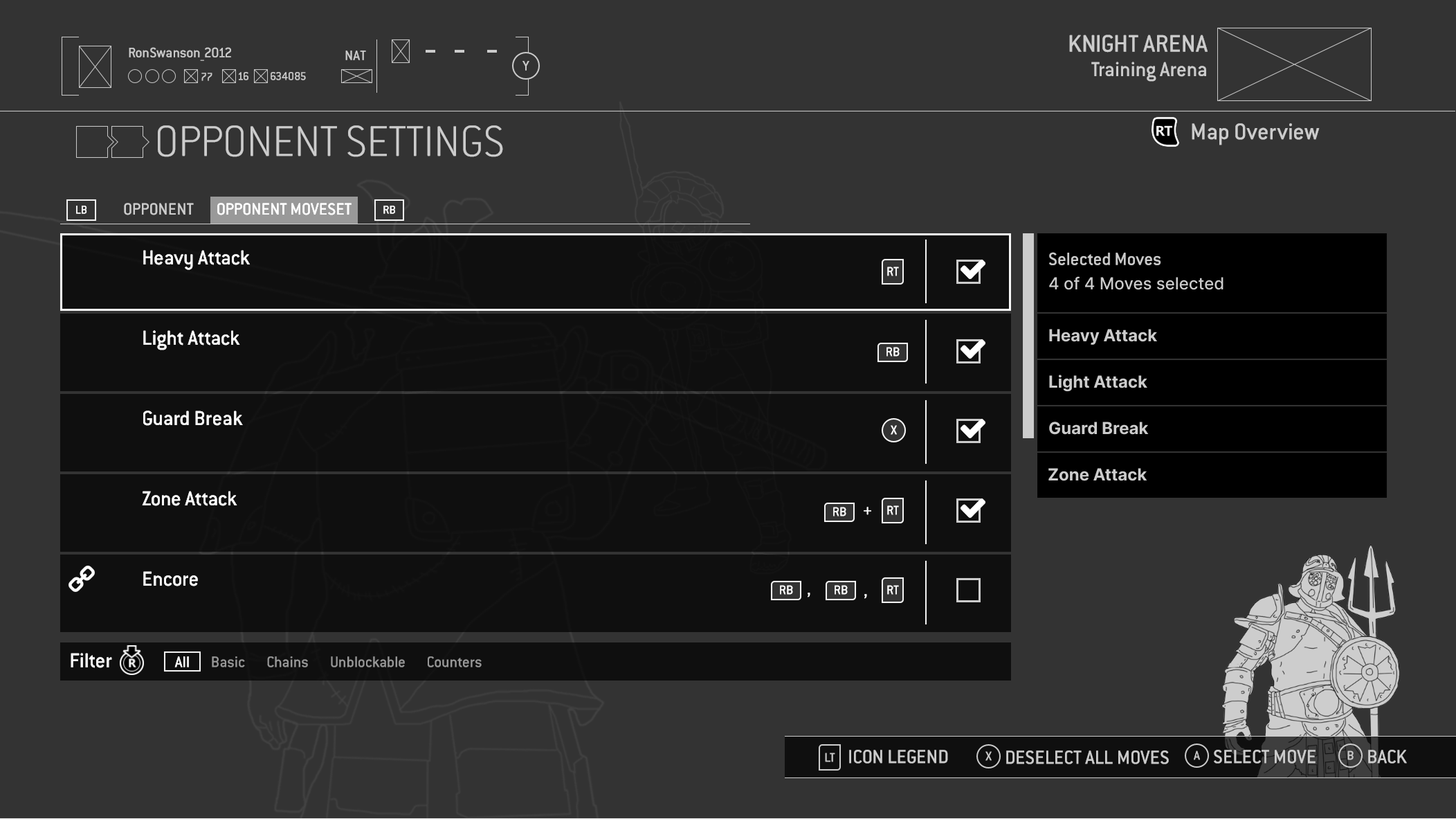
From the Opponent Settings menu, players are able to customise the AI. The Filter is anchored to the bottom of the Moveset and allows players to more efficiently find moves. The Selected Moves Panel is on the left, showing all currently enabled Moves.
Quick Settings
While we had designed the menus to be as efficient as possible, I saw an opportunity to make changing the most common of settings (those highlighted in the Red Routes diagram, for instance) even easier.
Repurposing the existing Quick Chat widget, the most frequently used settings could be modified here without ever needing to access the game menu. This was certainly a feature designed for more advanced players, but offered even more flexibility when practising.
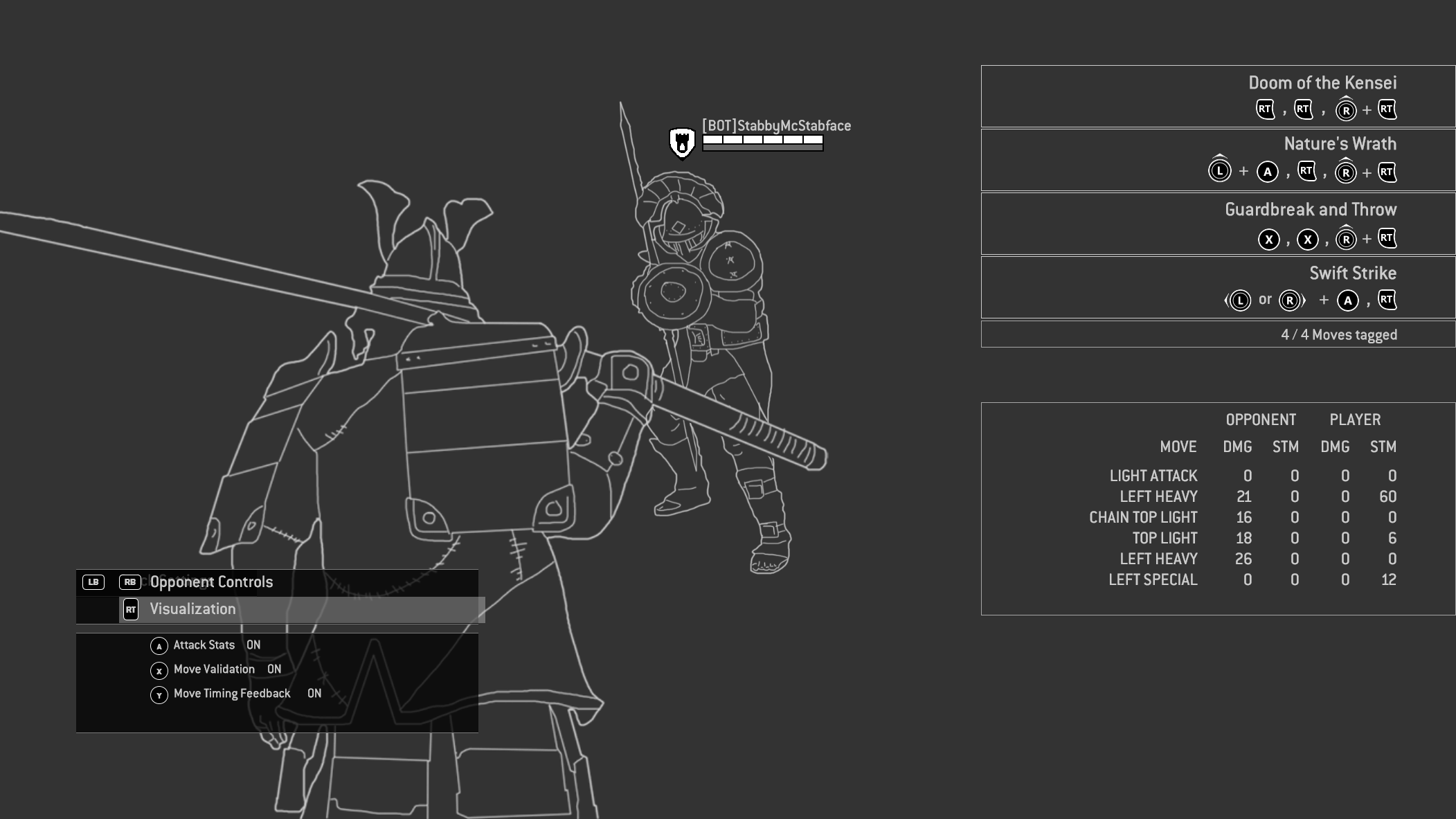
The expanded Quick Settings menu is displayed at the bottom left of the screen. Players can toggle between various settings without needing to access the full Arena menu.
Putting it all together
Overall the Training Arena was a massive success, striking the ideal balance as a tool for both new and advanced players. Even now, over 8 years since it launched, it is still seen as an essential tool within For Honor.
Below is the final prototype I developed in Axure which was used for usability testing and eventual implementation.
An interactive Axure prototype demonstrating the final Training Arena experience, the detail helping us refine the final product and iterate rapidly with stakeholders and players.
Onboarding redesign
Improve Tutorials
While the original onboarding went some way to prepare players, it simply wasn’t thorough enough to teach the full combat system, lacking the depth and context needed to teach complex mechanics. The goal of the new tutorials was that players should not just learn how to play, but understand when and why they should use the different mechanics.
Our game design team came up with a gamified approach to Trials built around contextual combat scenarios and a performance scoring system to drive engagement. To support this on the UX side, the goals I wanted to achieve were:
STREAMLINED FOCUS
Get players into the Tutorials as quickly as possible, and keep them engaged in the experience.
IMMEDIATE FEEDBACK
Satisfying feedback throughout each Trial, with a final "Ranking" screen to both provide feedback and encourage mastery.
DIRECT RETRY LOOP
For players motivated to improve their score, they could retry immediately.
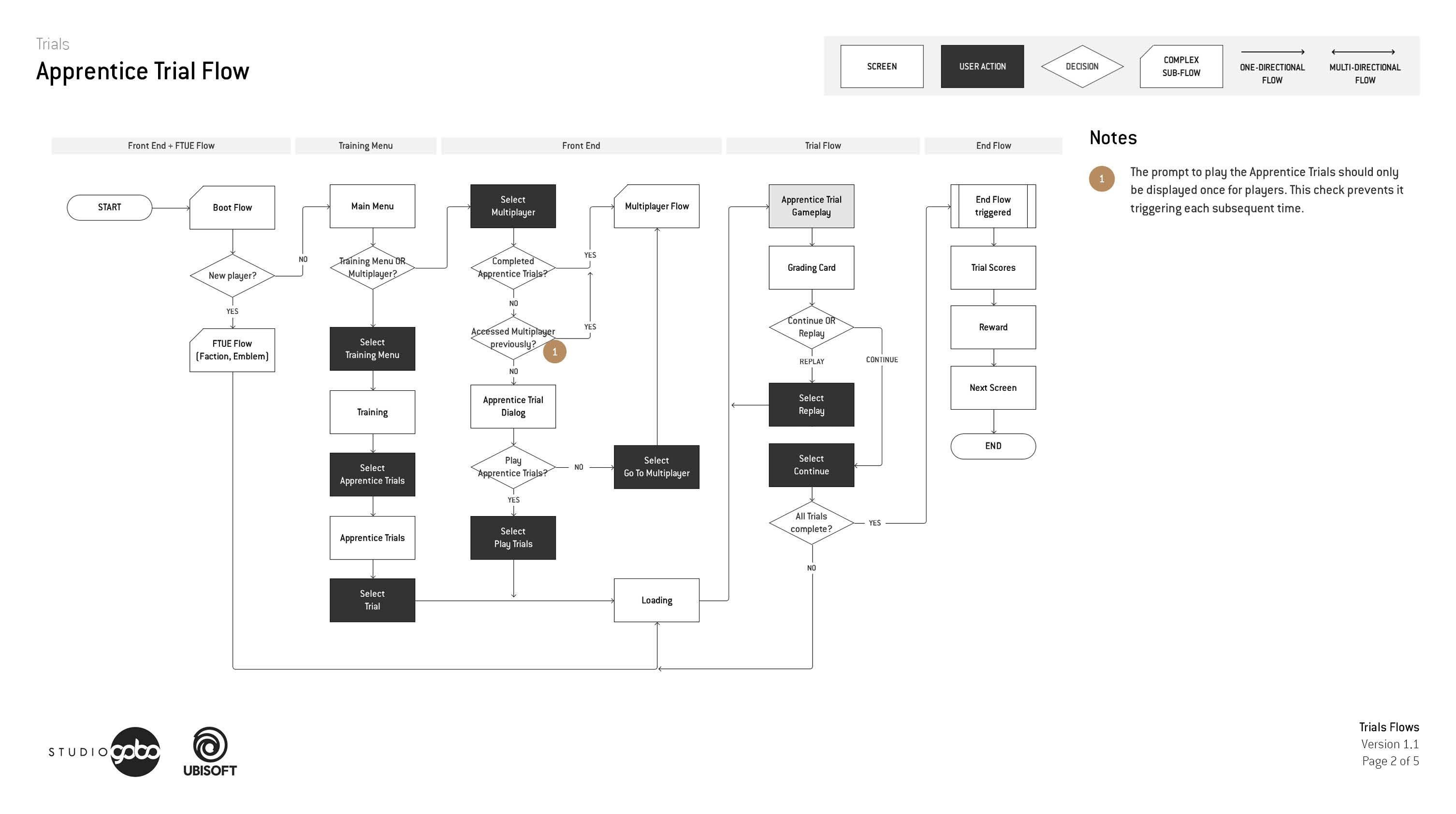
The user flow for the Apprentice Trials, including the First-time User Experience, minimising steps and allowing players to quickly replay to improve their rating.
Encouraging replayability
To emphasise the importance of the skills being taught, the designers came up with a scoring system. Players were awarded points for landing attacks, and bonus points for performing specific skills in each trial. This required a new HUD elements and feedback.
This went through a number of iterations before setting on a progression wheel which fills during the Trial. This could also communicate how well the player was doing, and how close they were to their goal in real time.
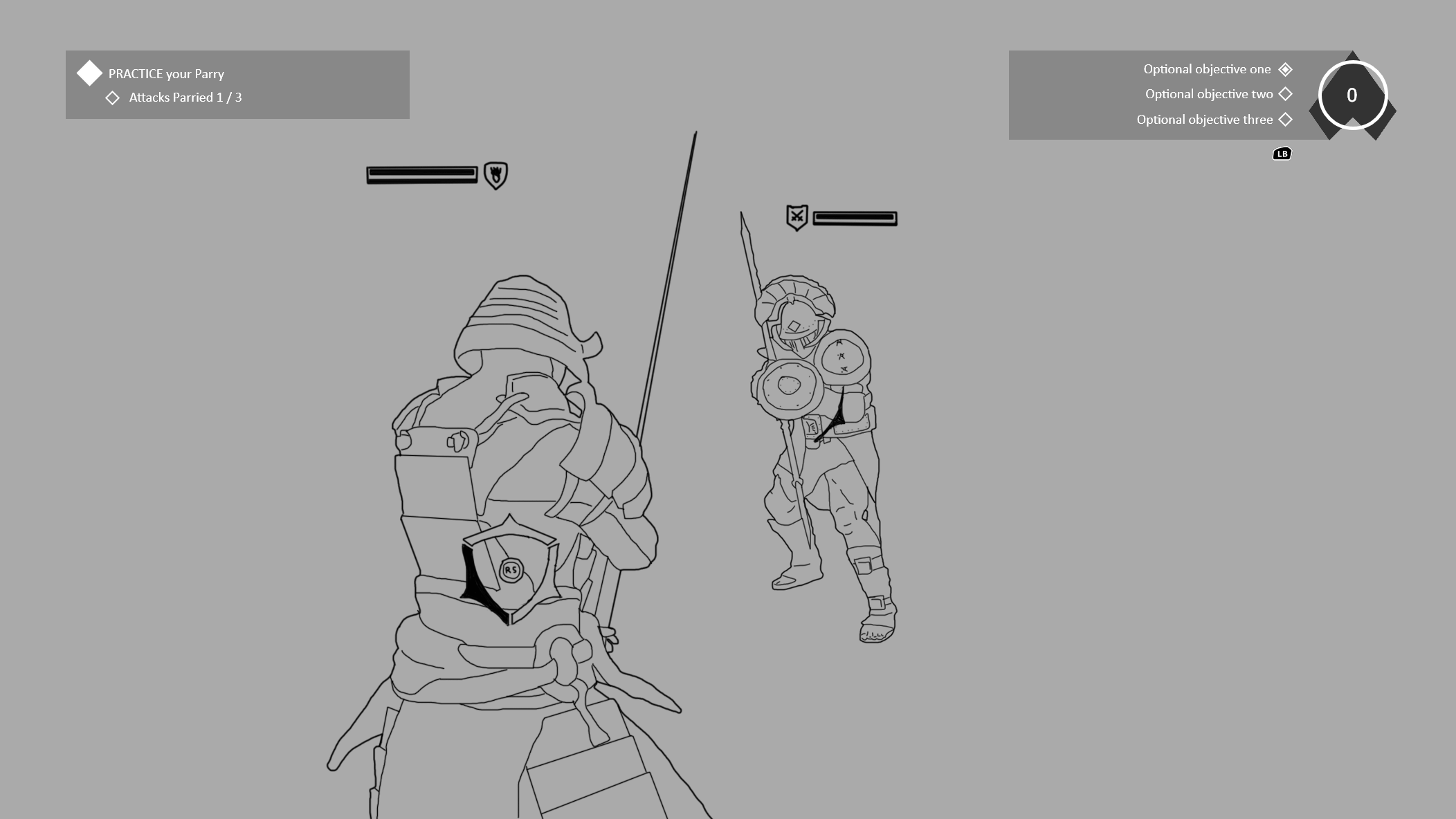
The HUD widget shows the player optional objectives and their score (top right), with the radial progress bar showing how close they are to achieving an A grade.
At the end of each trial the player is presented with their grade representing how well they'd done. From here they can continue to the next trial, or replay the current one - supporting the ability to very quickly try and improve their score. This was optional, never gating progress for players.
At the end of each trial the player is presented with their grade representing how well they'd done. From here they can continue to the next trial, or replay the current one - supporting the ability to very quickly try and improve their score. This was optional, never gating progress for players.
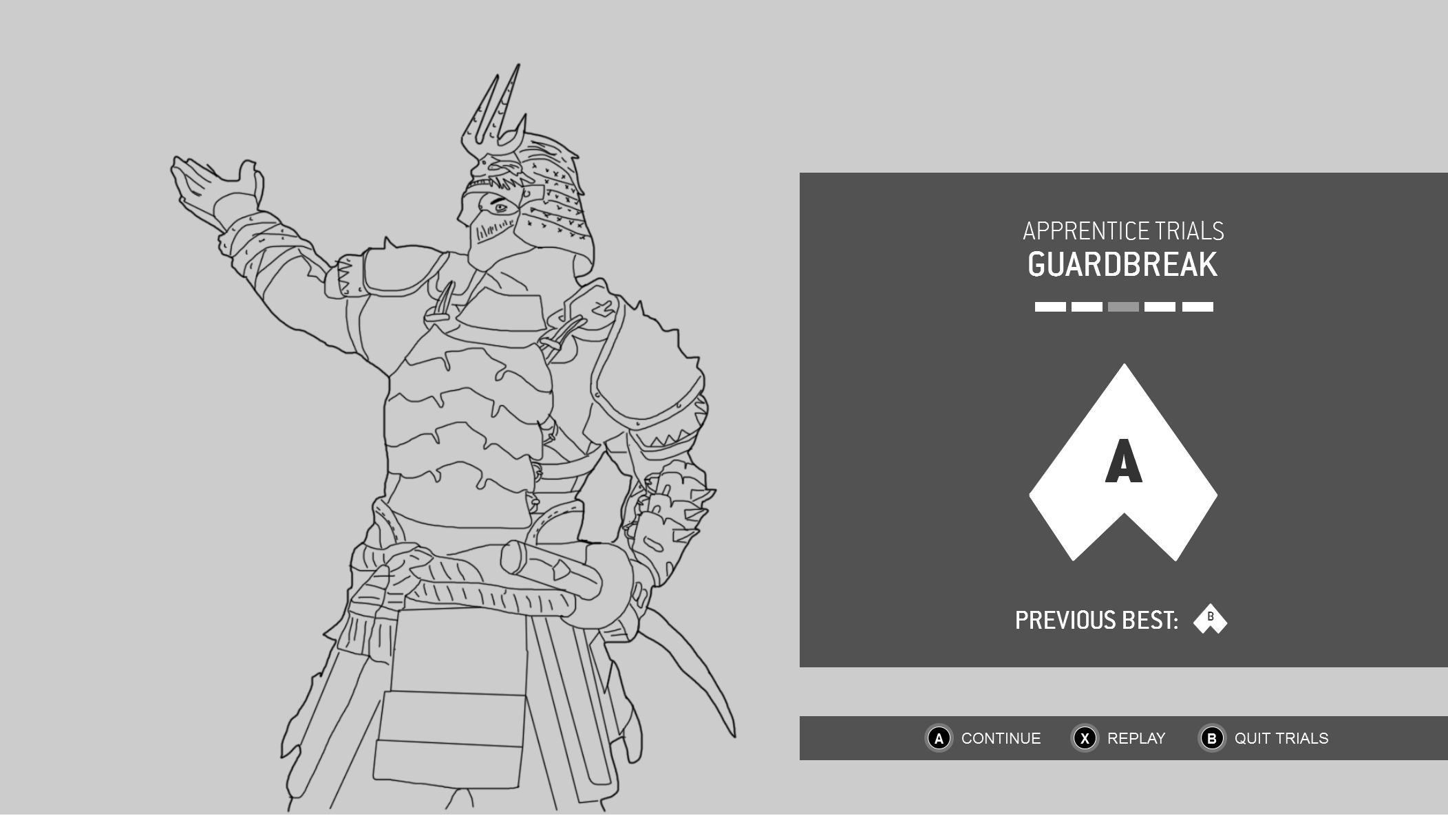
The design for the grading card emphasised the player's Hero to create a celebratory moment, while prominently displaying their grade and options to quickly retry or continue.
Layering on additional feedback
One of the biggest challenges when it came to teaching some of the deeper mechanics of For Honor was exposing the specific timing required. Skills such as Dodging, Parrying and Counter Guardbreaking all have small input windows which required dozens of hours of play to become comfortable with. For new players we wanted to expose some of this so they could more quickly build familiarity.
To accelerate learning without overwhelming players, we augmented the existing combat HUD with contextual visual feedback:
- In-Context Highlights: Highlighted native HUD elements to act as "training wheels" that players could easily transition away from.
- Timing Indicators: Iterated from a linear timeline to a semi-circle, ultimately landing on a dynamic needle widget to clearly visualize millisecond-level execution windows.
The original storyboard for the Opponent Typing Feedback, followed by the final implementation.
Outcome
At launch, the new training tools were well received by the community and critics alike. It may have been the first time I've seen players get excited for a tutorial! Praise was leveled at the depth of the trials, as well as the extra feedback added to help expose the deeper mechanics. New and expert players alike also loved the utility of the Training Arena, which they saw as providing a range of tools that supported them from mastering the basics, through to perfecting advanced playstyles at strategies at the highest levels of play.
The new training features were released to coincide with a free weekend. Of players that played through the Trials and spent time in the Arena, 79% ended up converting and purchasing the full game, a large improvement from previous free weekends and a testament to the success of these new features.
Internally at Ubisoft the format of the modes were seen as a benchmark for the quality and depth of new training features across all of their games.
Want to get in touch?
Want to learn more?
If you'd like to learn more about me, what I've worked on, or what I'm planning next, then drop me a line. I'm always happy to chat.
Most of the cool stuff I've worked on can't be shown here, but if you'd like to know more about those projects or anything else, just get in touch.